
- What: ADWS is used to bypass PowerShell AD enumeration detections
- Impact: Highlights the need for updated detection strategies
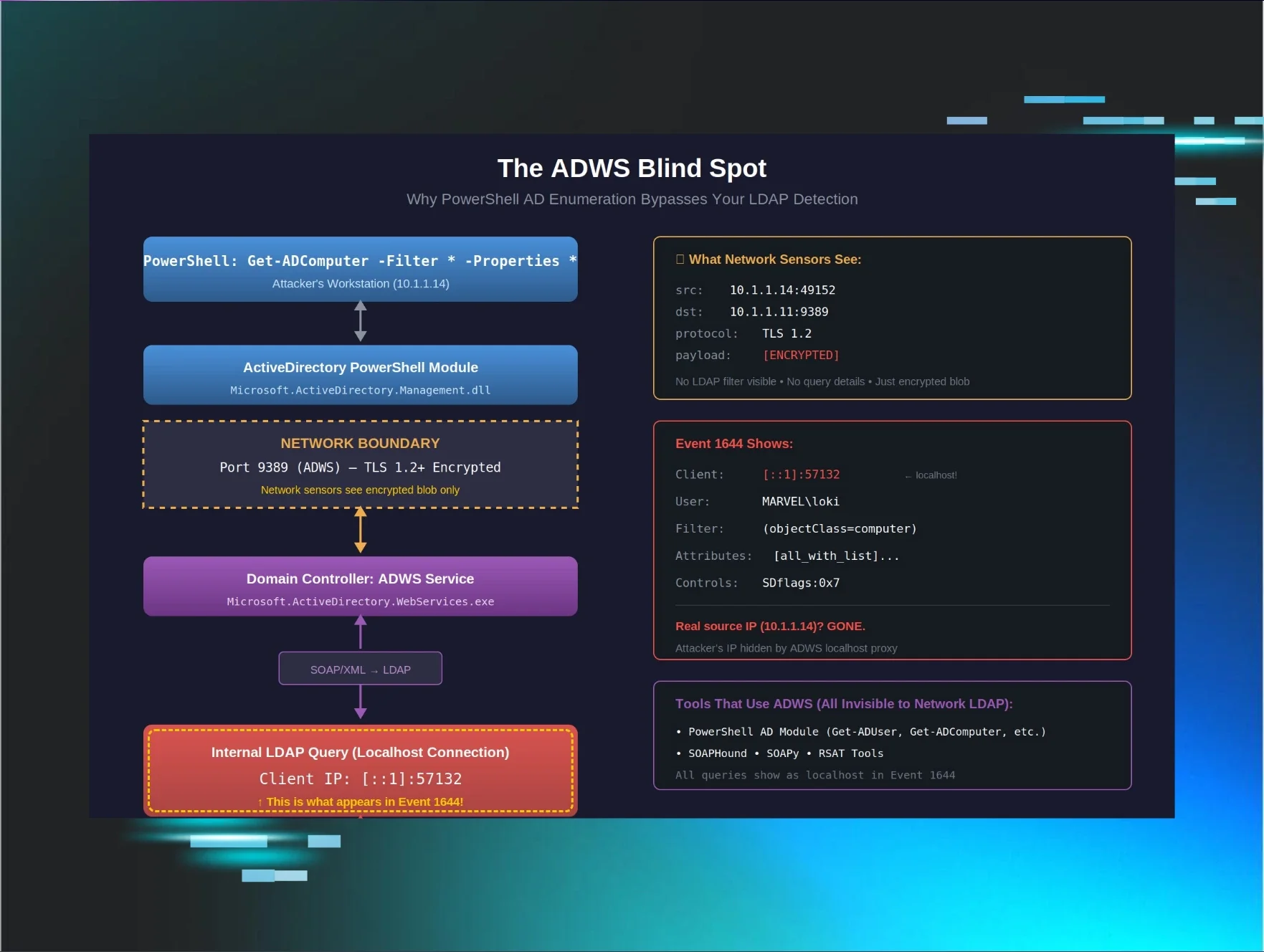
Home Blog From Code to Coverage (Part 5A): When All Your Detections Fail: The ADWS Blind Spot Published: April 8, 2026 From Code to Coverage (Part 5A): When All Your Detections Fail: The ADWS Blind Spot By: Andrew Schwartz Introduction: The detection that wasn't there I thought I had Active Directory reconnaissance covered. After four parts of this series, I had built detections for: Part 1 : OID Transformation - How Impacket's LDAP filters become bitwise operations in logs Part 2 : The Whitespace Nightmare - Building Sigma rules that handle formatting chaos Part 3 : SDFlags - The hidden LDAP parameter that reveals BloodHound Part 4 : The (!FALSE) Pattern - How SOAPHound's queries transform and how to detect them This part is different. There's no attacker code to reverse engineer. The threat actor used native PowerShell. This is the story of why that was enough to bypass everything. Sigma rules were parsing Event 1644 filters. I was confident. Then I reviewed logs from an actual intrusion. The command that changed everything The threat actor had successfully enumerated an entire Active Directory environment. Every computer object. Every property. Security descriptors. Group memberships. Service Principal Names. Everything. The command was sitting right there in the PowerShell logs: geT-aDcompUTER -Filter {eNaBLed -eq $TruE} -PROPErTieS * None of my detections fired. The attacker pulled 500+ computer objects with full properties and security descriptors, and walked away clean. My detections from Parts 1–4 were completely blind to this. Case obfuscation. That's it! "You have to be f[ing] kidding me!" That's what bypassed months of detection engineering work. But here's what really bothered me: the case obfuscation wasn't even why it worked. Even if they had typed a perfectly normal Get-ADComputer with no obfuscation at all, my detections still wouldn't have fired. The case mixing was irrelevant, just bonus evasion on top of a blind spot I didn't know existed. That realization sent me down a weeks-long rabbit hole: why was PowerShell AD enumeration, obfuscated or not, completely invisible to everything I'd built? Why detection failed: The ADWS blind spot To fix my detection gap, I needed to understand exactly how PowerShell talks to Active Directory and why it's invisible to traditional LDAP detection. Here's what I learned the hard way: PowerShell doesn't use LDAP over the network. When you run Get-ADComputer from a workstation, PowerShell doesn't make an LDAP connection to port 389 or 636. Instead, it uses Active Directory Web Services (ADWS), a SOAP/XML-based web service that runs on port 9389 with TLS encryption. The traffic is completely invisible to network-based LDAP detection: Figure 1: The ADWS blind spot. PowerShell never touches port 389, it uses encrypted SOAP on port 9389, and by the time it becomes LDAP, the client IP is localhost. The critical architectural detail When ADWS queries Active Directory on behalf of a remote PowerShell session, it makes those queries as localhost ( ::1 or 127.0.0.1 ) on the domain controller. The original client IP is logged in ADWS-specific events (1138/1139), but the actual LDAP query (Event 1644) shows localhost. This creates three detection problems: Network LDAP sensors are blind - The query never touches port 389/636 Event 1644 shows localhost - Looks like internal system activity, not remote enumeration The attacker's real IP is hidden - Buried in the LDAP logs as [::1] Event 1644 shows: Client: [::1]:57132 ← Localhost, not the attacker's IP! User: DOMAIN\attacker Filter: ( & ( ! (userAccountControl&2) ) (objectClass=computer) ... ) To my detection logic, this looked completely normal: localhost talking to itself with a valid domain account. The case obfuscation red herring The attacker used case obfuscation ( geT-aDcompUTER ), trying to evade PowerShell command-line logging, script block logging patterns ,and string-matching security tools. But it was irrelevant. PowerShell is case-insensitive, and by the time the query reaches the domain controller, it's translated to standard LDAP: PowerShell: geT-aDcompUTER -Filter {eNaBLed -eq $TruE} ↓ ADWS Translation Layer ↓ LDAP: ( & ( ! (userAccountControl&2) ) (objectClass=computer) ) No trace of the case obfuscation. No trace of PowerShell syntax. Just clean, optimized LDAP. The obfuscation successfully evaded endpoint detections, but that wasn't the real problem. The real problem was that I had no detection strategy for ADWS at all. The investigation that led here After this incident, I spent weeks in the lab: Enabling field engineering logging on domain controllers Capturing Wireshark on a span port watching port 9389 Running every enumeration command I could think of Correlating events across Event IDs 1138, 1139, 1166, 1167, and 1644 Understanding ADWS architecture - How PowerShell really talks to AD This blog post is the result of that investigation. It's not theoretical; it's lessons learned from real detection failure, real log analysis, and real testing in my MARVEL.LOCAL lab environment. This is Part 5A: How I learned to detect what I couldn't see. What makes ADWS detection different ADWS requires a fundamentally different detection approach than Parts 1–4. The table below compares the two pipelines side by side: Parts 1–4: Network LDAP Detection Part 5A: Host-Based Multi-Event Correlation Pipeline [Attacker’s Python Script] ↓ Port 389/636 (LDAP/LDAPS) ↓ Network Packet Capture ↓ Parse LDAP Filter & Analyze ↓ Detection Alert [PowerShell Get-ADComputer] ↓ Port 9389 (ADWS – encrypted) ↓ [DC: ADWS Service] ↓ Events 1138/1139: Connect + Auth ↓ [Internal LDAP via ::1] ↓ Event 1644: Query Details Events 1166/1167: Stats + Indexes ↓ Correlate by Operation ID ↓ Detection Alert Result ❌ Blind to PowerShell • PowerShell uses port 9389, not 389/636 • Event 1644 shows ::1, not attacker IP • No tool-specific signatures • Looks like normal DC activity ✅ Catches PowerShell • DC logs every step of the ADWS process • Event 1644 shows the actual LDAP filter • Events 1138/1139 reveal who made the query • Multi-event correlation = high-fidelity detection The key insight: Event 1644 alone shows localhost, hiding the attacker. But when you correlate it with ADWS connection events, you get the full picture, including who’s really behind the query. That’s the detection gap this post closes. Analyzing the threat actor's command Let's dissect what the attacker actually did and why it bypassed detection: The command geT-aDcompUTER -Filter {eNaBLed -eq $TruE} -PROPErTieS * What the attacker intended Case Obfuscation: geT-aDcompUTER instead of Get-ADComputer Goal: Evade PowerShell command-line logging detections Target: EDR solutions looking for exact string matches Result: Successfully evaded endpoint detection Filter Logic: {eNaBLed -eq $TruE} Goal: Get only enabled computer accounts (active targets) Translation: PowerShell converts this to !(userAccountControl&2) bitwise check Result: Efficient query using AD indexes Full Property Dump: -PROPErTieS * Goal: Collect maximum information for later exploitation What it retrieves: Operating system versions (patch levels) Service Principal Names (Kerberos attacks) Last logon timestamps (active vs stale) DNS hostnames (network mapping) Group memberships (privilege identification) Security descriptors (permission enumeration) 50+ attributes per computer object What actually happened on the domain controller When the command is executed, here's the event chain from the MARVEL.LOCAL lab recreation: PowerShell Client Side (WAKANDA-WRKSTN): geT-aDcompUTER -Filter {eNaBLed -eq $TruE} -PROPErTieS * # Case obfuscation doesn't matter - PowerShell is case-insensitive Domain Controller - ADWS Service (Earth-DC): Receives encrypted SOAP/XML request on port 9389 Decrypts TLS payload Parses PowerShell query from SOAP envelope Translates to LDAP filter syntax Makes LOCAL LDAP connection to NTDS via [::1] Returns results wrapped in SOAP/XML Event Logs Generated: Event 1644 (What my Part 5 detection saw): Client: [::1]:57132 ← Localhost! Not attacker IP! User: MARVEL\loki Filter: ( & ( ! (userAccountControl&2) ) (objectClass=computer) (objectCategory=CN=Computer,CN=Schema,CN=Configuration,DC=marvel,DC=local) ) Attribute Selection: [all_with_list]name,objectClass,objectGUID,...[50+ attributes] Server Controls: SDflags:0x7 Visited entries: 3 Returned entries: 3 Search time: 16ms Why my detections missed it: Client IP was [::1] - I filtered out localhost as "system activity" User was valid domain account - no credential stuffing pattern Query was efficient (3/3 efficiency ratio) - looked like optimized admin query Low object count (only 3 computers in test domain) - below volumetric threshold Fast query time (16ms) - not slow enough to trigger expensive search alerts My baselines said, "This looks normal." It wasn't. What I missed: The ADWS context Event 1644 alone doesn't tell the full story. I needed to see: Event 1138 (ADWS Connection): User: MARVEL\loki Client: [::1]:57132 ← This correlates with Event 1644! Operation: ldap_search Operation ID: 5 Event 1139 (ADWS Authentication): Operation ID: 5 ← Same operation! Status: 0 (Success) User: MARVEL\loki Events 1166 (Per-Object Stats): Operation ID: 5 Object: CN=WAKANDA-WRKSTN,CN=Computers,DC=marvel,DC=local Object: CN=Earth-DC,CN=Computers,DC=marvel,DC=local Object: CN=Asgard-WS,CN=Computers,DC=marvel,DC=local Event 1167 (Index Usage): Operation ID: 5 Index: idx_objectCategory:3:N The pattern I should have seen: All these events share Operation ID 5 and occur within a 10-second window. When you correlate them: E v ent 1138 (Start) + Event 1644 (LDAP Details) + Event 1166 (Results) + Event 1167 (Indexes) + Event 1139 (Complete) = PowerShell AD Enumeration Session But I wasn't correlating events. I was looking at Event 1644 in isolation. The [all_with_list] Indicator The attribute selection field showed: [all_with_list]name,objectClass,objectGUID,sAMAccountName,dN