
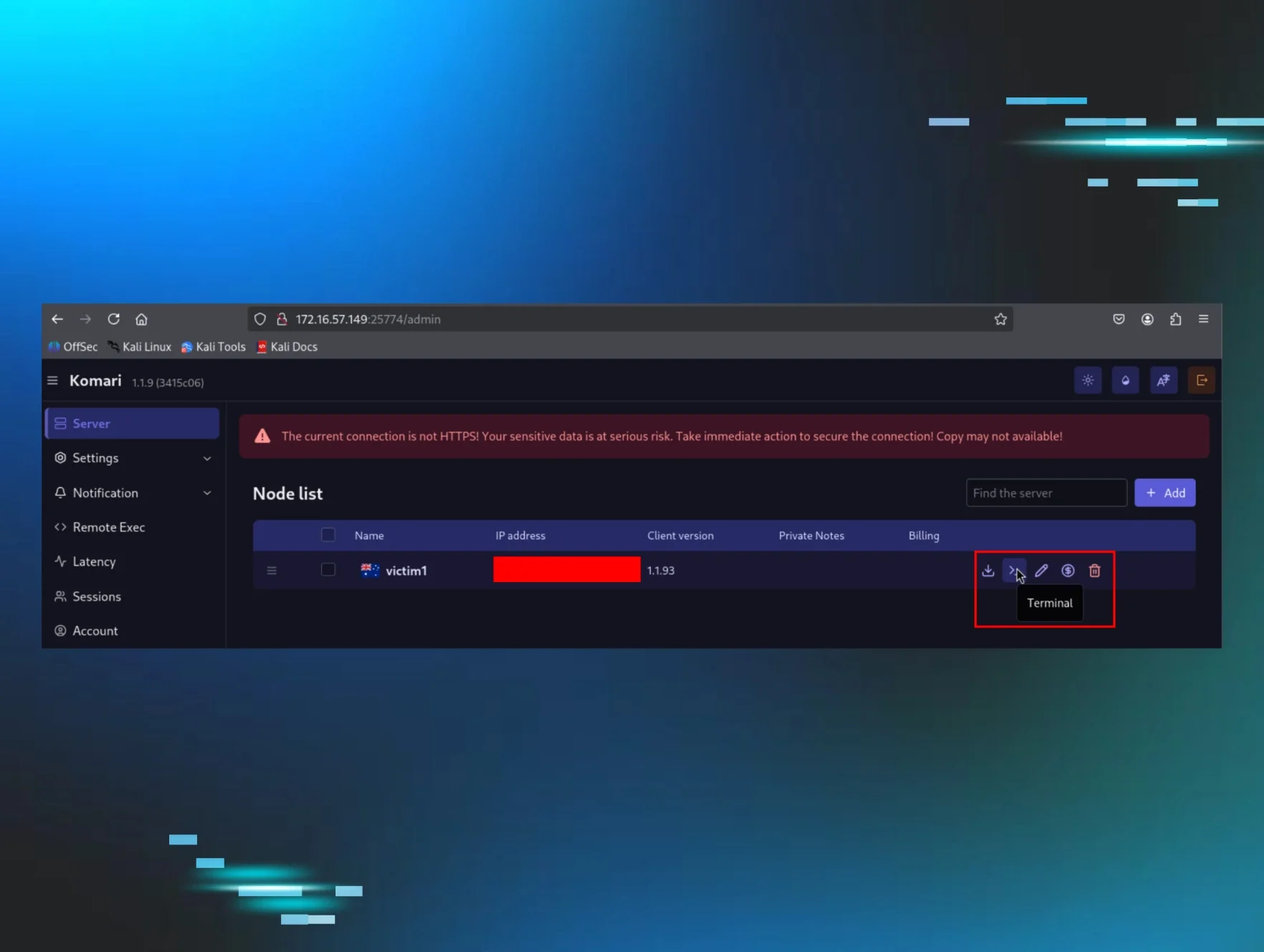
The Komari agent, a legitimate Go-based monitoring tool, was weaponized as a backdoor after threat actors gained initial access via stolen VPN credentials, pivoted to a Windows workstation via Impacket, and installed it as a persistent service using NSSM. The tool inherently functions as a command-and-control channel, providing a reverse shell and arbitrary command execution via a default-enabled WebSocket connection, allowing attackers to leverage trusted GitHub infrastructure for staging. No specific vulnerability, CVSS score, or affected software versions are detailed in the article, as the threat stems from the malicious abuse of a legitimate tool's built-in capabilities.
Home Blog Komari: The “Monitoring” Tool That Didn't Need Weaponising Published: April 30, 2026 Komari: The “Monitoring” Tool That Didn't Need Weaponising By: Josh Kiriakoff Key Takeaways On April 16, 2026, a threat actor used stolen VPN credentials to pivot into a Huntress partner Windows workstation and dropped a SYSTEM-level backdoor using the Komari agent - a 4.3k-star, MIT-licensed, Go-based project on GitHub that self-describes with the repo topic tags remote-control, monitoring, and monitoring-tool. We believe this is the first publicly documented case of Komari being abused in a real-world intrusion. Komari is not a telemetry tool that happens to be abusable - it is a bidirectional control channel by design. The agent opens a persistent WebSocket to its server and accepts three server-to-agent event types out of the box: exec (arbitrary command execution via PowerShell / sh), terminal (interactive PTY reverse shell in the operator’s browser), and ping (ICMP / TCP / HTTP probing). All three are enabled by default; the --disable-web-ssh flag is opt-in. The operator installed Komari as a persistent Windows service named “Windows Update Service” via NSSM (the “Non-Sucking Service Manager”), pulling the installer directly from the official Komari GitHub repository. No attacker-controlled infrastructure was needed to stage the loader. Initial access was a single SSLVPN session from 45.153.34[.]132 ( VMHeaven[.]io / AS 51396 ) authenticated as [User 1], handed an internal tunnel IP of 10.212.134[.]200 . From that tunnel IP, Impacket smbexec.py was used to enable RDP on [REDACTED-WRKSTN], and the Komari agent was installed from an interactive RDP session. Microsoft Defender caught and quarantined an earlier Behavior:Win32/RegDump.SA attempt against svchost.exe , forcing the adversary to pivot away from registry hive dumping and into a “C2 living off the trust of GitHub.” Table of Contents Background Initial access: The SSLVPN Enumerating from the VPN tunnel Remote Registry and a Defender save Pivoting to RDP via smbexec.py The RDP leap Typing at the prompt: The install Komari isn’t (just) a monitoring tool. It’s a C2. The protocol: One WebSocket, three events NSSM: How Komari becomes persistence So, what did Komari give the operator? So what did Huntress do? Conclusion Indicators of Compromise Background Late in the evening on April 16, 2026 (UTC), Huntress registered a cluster of high-severity detections on a single workstation, [REDACTED-WRKSTN], in one of our partner environments. The Huntress Managed EDR signals told the SOC a familiar story—a cmd.exe spawning as a service, an smbexec.py -style service-name pattern, a Microsoft Defender quarantine on svchost.exe -labeled Behavior:Win32/RegDump.SA —but the tail of the detection chain was new: a PowerShell one-liner pulling an installer from raw.githubusercontent[.]com/komari-monitor/komari-agent and wiring it up as a SYSTEM service called “ Windows Update Service ”. Huntress SOC and Hunt analysts have spent the last two years documenting the steady drift of open-source DFIR and systems-administration tools into the adversary toolbox: Velociraptor , SimpleHelp , Net Monitor for Employees , ScreenConnect , AnyDesk , Nezha , and Atera . Komari is the new entry on that list, and a particularly pointed one, because unlike the other tools in that lineup, Komari does not require any abuse to function as a command-and-control (C2) channel. The control channel ships enabled by default. You do not weaponise it; you just point it at a server you “own” and type an install command. What follows is the story of that intrusion in the order it actually happened—one workstation, [REDACTED-WRKSTN]. One compromised account, [User 1]. One new C on the scene. Figure 1: Cluster of high-severity detections on [REDACTED-WRKSTN] Initial access: The SSLVPN The first event in this story isn't on the workstation; it's on the FortiGate. On 2026-04-16 at 23:23:33 UTC, a new SSLVPN session came up from remote IP 45.153.34[.]132 and authenticated as [User 1]: Figure 2: FortiGate SSLVPN session establishment for [User 1] from 45.153.34[.]132 Note: The FortiGate timestamps are local -0500; add 5 hours to the UTC values we use for the rest of this post. Two details to sit with. First, remip=45.153.34[.]132 resolved to VMHeaven[.]io (Netherlands) ASN 51396 - a hosting / VPS provider we have seen on previous intrusions used as both an SSLVPN egress and a staging host (per our external threat intelligence resources). Second, tunnelip=10.212.134[.]200 is the address FortiGate handed to the SSLVPN session; it’s the source IP that will appear in every post-compromise logon event on [REDACTED-WRKSTN] for the next twenty minutes. Enumerating from the VPN tunnel Once the tunnel was up, the operator's laptop—identifying itself to Active Directory as workstation name VM8514 —began reaching into the partner environment from 10.212.134[.]200 . That workstation name, VM8514 , isn't something the partner hands out. It's a forensically "cheap" default name typical of a freshly-cloned virtual machine - the sort of label an operator might leave on a throwaway VM if they're moving quickly. The pattern ("VM" + four digits, no domain suffix, no asset-tag prefix) is one we've seen recur across commodity-operator intrusions where the actor is working from disposable infrastructure rather than a dedicated attack host. [REDACTED-WRKSTN] was the destination workstation, and starting at 23:37:41 UTC, type-3 network logons as [User 1] from 10.212.134[.]200 began accumulating in the workstation's security event log. Remote Registry and a Defender save At 23:38:00 UTC, Remote Registry lit up on [REDACTED-WRKSTN]: 2026-04-16 23:37:00 UTC svchost.exe -k localService -p -s RemoteRegistry At 23:39:52 UTC, services.exe had already spawned the first of a five-command smbexec.py chain - a one-line cd as a sanity check that the remote-exec method was working: Figure 3: Huntress example detection for smbexec on the host [REDACTED-WRKSTN] This is a classic Impacket smbexec.py -over-SMB output shape: %COMSPEC% /Q /c echo , with the output redirected to \ \<COMPUTERNAME>\C$\__output_<random> , randomly-named 8-character batch file on disk, immediate self-delete. Not a moment later, at 23:39:55 UTC, System Event ID 7040 recorded Remote Registry transitioning from disabled to demand start - attributed via SID S-1-5-21-...-1153 , [User 1]’s domain SID. By 23:40:02 UTC, Windows Defender had something to say about it. Event ID 1116 fired on svchost.exe with threat name Behavior:Win32/RegDump.SA , quarantined. Figure 4: Huntress detection for RegDump.SA on the host [REDACTED-WRKSTN] RegDump.SA is Microsoft’s behavioural signature for registry hive dumping - the kind of thing reg save, reg export, or (more commonly in modern IR) Impacket’s secretsdump.py does when it reaches in over MS-RRP/WINREG to pull SAM, SYSTEM, and SECURITY hives off a remote host. The dropped artifact, C:\Windows\Temp\aRhRnnHI.tmp , matches the size profile of a compressed registry hive extract. Although Defender successfully quarantined the staging file, the threat actor had already escalated to SYSTEM on the endpoint; the malicious action that produced the dump had already completed. The actor now had two options - get louder and try again with a different hive-dump method, or change the whole approach. Spoiler: they changed the approach. Pivoting to RDP via smbexec.py Between 23:40:07 and 23:40:41 UTC, the same smbexec.py chain ran the four commands that actually matter. All four were parented to the same services.exe running under the privileged context NT AUTHORITY\SYSTEM - the calling card of Impacket's smbexec.py used as a lateral command executor. Figure 5: Huntress detections displaying smbexec executing four separate commands on the host [REDACTED-WRKSTN] The four randomised 8-character batch filenames ( SCnRMUvT , BPzrQOLa , HBBJLmCW , PlYHZsEC ), together with the matching _iDhLsdpD suffix on the __output pipe, are the giveaway—this is most likely smbexec.py 's r andomString() at work. Vanilla Impacket ships with a static service name of BTOBTO and a plain __output filename, so the fact that we're seeing randomised artifacts at all tells us the operator was running a customised smbexec fork built to evade detection. Strung together, the four commands (after the initial “ cd ” sanity check) do three things: A " r eg add " flipping HKLM\SYSTEM\CurrentControlSet\Control\TerminalServer\fDenyTSConnections from 1 to 0 , switching RDP from " deny " to " allow " system-wide. A " netsh advfirewall " rule named " Allow RDP " opens inbound TCP/3389 . The " net stop termservice /y " and " net start termservice " pair, bouncing the Terminal Services stack so the registry and firewall changes take effect cleanly. Put together, this is a textbook hands-on-keyboard RDP enablement kit—the kind of thing we see as a precursor to interactive access and, very often, ransomware deployment. The RDP leap Now that RDP is listening on TCP/3389 , the operator abandoned the scripted smbexec.py method and switched to an interactive session. At 23:44:03 and 23:44:05 UTC, two Type-3 network logons as [User 1] occurred on [REDACTED-WRKSTN] from 10.212.134[.]200 , this time with the workstation name VM8514 . Two seconds later, at 23:44:07 UTC, the Terminal Services RemoteConnectionManager reported an Event ID 1149 - “ User Authentication Succeeded ” for [User 1] - followed immediately at 23:44:08 UTC by LocalSessionManager Event ID 25 (“ RDP Session Connected ”) from the same 10.212.134[.]200 source: 2026-04-16T 23:44:07.331Z Microsoft-Windows-TerminalServices-RemoteConnectionManager/1149 Computer: [REDACTED-WRKSTN].[REDACTED].local User: [User 1] Domain: [REDACTED].local IP: 10.212.134[.]200 2026-04-16T 23:44:08.977Z Microsoft-Windows-TerminalServices-LocalSessionManager/25 "RDP Session Connected" Computer: [REDACTED-WRKSTN].[REDACTED].local User: [REDACTED]\[User 1] IP: 10.212.134[.]2