
- What: Huntress details defense evasion tactics used by The Gentlemen ransomware
- Impact: Highlights tactics used by ransomware groups to bypass security
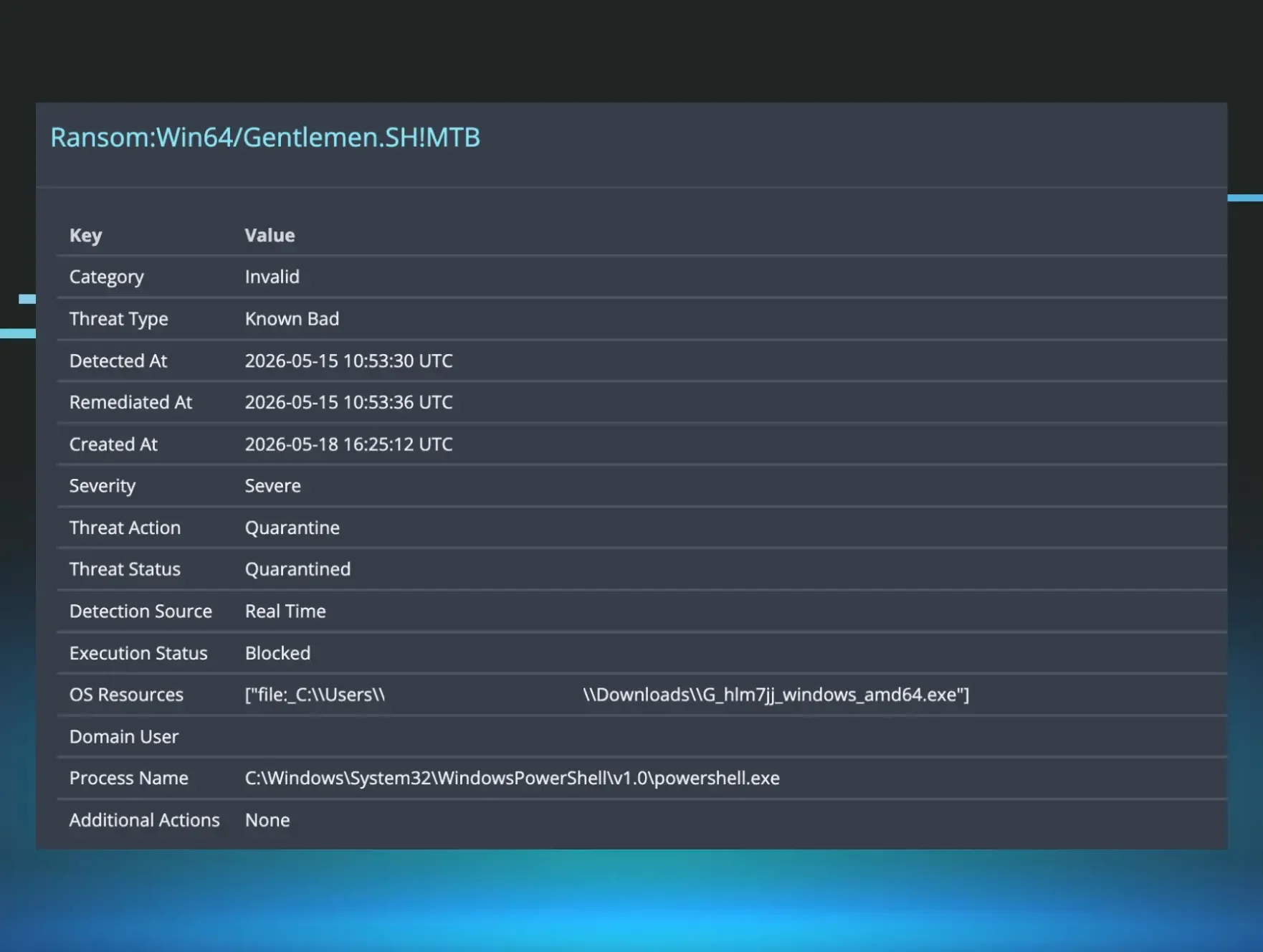
Home Blog The Gentlemen (Ransomware) in Disguise: Defense Evasion and other TTPs Published: May 21, 2026 The Gentlemen (Ransomware) in Disguise: Defense Evasion and other TTPs By: Harlan Carvey Lindsey O'Donnell-Welch Key Takeaways In April and May, Huntress investigated two incidents involving The Gentlemen, a ransomware-as-a-service (RaaS) operation that has reportedly been gaining traction since its launch in mid-2025 Both incidents included the use of Scheduled Tasks, PowerShell, and some defense evasion or impairment tactics: in both cases, the Security , System , and Application Event Logs were cleared, and PowerShell commands aimed to disable Microsoft Defender and add antivirus exclusions A recent leak of The Gentlemen operation’s internal chats reveals several other ways its operators are targeting security gaps in organizations Acknowledgments: Huntress wishes to recognize the contributions of SOC analysts Nick Roddy and Dani Lopez for their investigations and analysis into these incidents. The Huntress SOC recently came across two incidents involving The Gentlemen ransomware, an operation that first emerged in mid-2025 and has been very active since then, with Ransomware.live showing claims of over 400 victims across at least 70 countries. One intriguing aspect of previous The Gentlemen incidents is the defense evasion strategy used by threat actors that have deployed the ransomware. According to a Trend Micro report , threat actors have used custom-built defense evasion tools and capabilities to disable security solutions in The Gentlemen attacks. A more recent leak of the operation’s internal database, in early May, further revealed its operators relying on a group of tools dedicated to security tool evasion, and techniques for abusing Windows logging. The Gentlemen is a RaaS operation, meaning that it can be distributed in attacks by affiliates, and as such, the observed attack chains will very often differ between attacks. Our investigation into the two incidents where The Gentlemen was deployed revealed several commonalities in TTPs, including the use of Scheduled Tasks and PowerShell. We did also see some basic defense evasion tactics: in both incidents, the Security , System , and Application Event Logs were cleared, although curiously other Windows Event Logs were untouched. The threat actors in these incidents also tried to evade antivirus solutions after their first attempt to deploy the encryptor was blocked. Our insight into how attacks play out within impacted organizations themselves, combined with the leaked chat corpus revealing the under-the-hood operations of The Gentlemen, offer detailed insight for defenders trying to better understand the incidents linked back to this ransomware. A not so gentlemen-ly ransomware The industry is now learning more about The Gentlemen because an insider with access to their information leaked an internal database belonging to the operation in early May. The leak exposed several accounts, including one purportedly belonging to the group’s administrator, who runs the infrastructure and builds the ransomware’s locker and panel. The leak gave an inside look at how the operation works, including initial access vectors (such as edge appliances), CVEs the actors are tracking (including Fortinet authentication bypass flaw CVE-2024-55591 ), and how ransom negotiations play out. Previous analysis of The Gentlemen ransomware samples by Check Point researchers has shown eight affiliate IDs tied back to the Tox messaging network that the operation was using – including a Tox ID belonging to the administrator, which indicates that The Gentlemen administrator may also actively engage in some of the attacks, in addition to affiliates. Previous public reports have also pointed to various techniques used by threat actors deploying The Gentlemen ransomware, including the use of legitimate driver abuse, the leveraging of Group Policy Objects (GPO) to enable domain-wide attacks, and persistence via remote access software (specifically AnyDesk). Huntress SOC analysts observed two incidents where The Gentlemen ransomware was deployed in April and May. In both incidents, the Huntress agent was deployed post-incident, limiting our visibility into what happened. EDR telemetry from during the attack itself was not available, which could have given valuable insight into the malicious behavior that triggered detections. The impacted organizations did not have SIEM, further limiting data that could show specifics around initial access. However, based on further investigation into the available telemetry, including PowerShell and Windows Event Logs, we were able to gather breadcrumbs about how the attacks unfolded. A shipping and transportation org incident On April 10, the Huntress agent was added to an organization in the shipping and transportation sector post-incident. The first point of visibility we had for the Windows Event Logs started on April 9 and showed the threat actor initiating a Remote Desktop Protocol (RDP) connection using a compromised user’s account. This doesn’t necessarily mean that initial access was achieved via RDP; rather this is as far back as our visibility allowed us to see. Shortly after the threat actor initiated and then established the RDP connection, they attempted to run the file encryptor ( win.exe ) locally from the Documents folder, as seen in the following command line: C:\Users\REDACTED\Documents\win.exe --password REDACTED --T 200 --superfast Windows Event Logs (specifically Microsoft Defender Event IDs 1116 and 1117) showed Microsoft Defender detecting and blocking this attempt. The logs also showed Defender detecting and blocking Trojan:Win32/MpTamperBulkExcl.H , a PowerShell script that was executed and attempted to tamper with antivirus exclusions. The threat actor then created a series of Scheduled Tasks (likely on the Domain Controller, as we didn’t see the Event Log Microsoft-Windows-TaskScheduler/140 records that we would expect to see with tasks created locally on the endpoint). One of these was used to run the file encryptor again. On April 10, the attacker also cleared the System , Application , and Security Windows Event Logs. We get a clear forensic breadcrumb here through a series of Event Logs (specifically Event ID 104 for the Application and System Logs, and Event ID 1102 for the Security log, showing that all have been cleared). However, the threat actor only cleared these three logs, rather than all log files; meaning that there are still plenty of other footprints to investigate. We get some further information about the threat actor’s subsequent efforts to deploy the ransomware while looking at another source of forensic telemetry, the Managed Antivirus (MAV) detections linked to the attack, which fired off when the Huntress agent was installed. Figure 1: View of Defender detection of malicious executable These showed a second instance of the same win.exe ransomware payload detected on April 10, which was found on the NETLOGON share and executed by the SYSTEM account through the Configuration Manager Client ( CcmExec.exe ). As Figure 1 indicates (and Microsoft Defender Event ID 1118 within the logs validates), Microsoft Defender detected this but failed to execute the designated remediation. After the payload was successfully deployed, files were encrypted with an extension .fjn1jw and the ransom note ( README-GENTLEMEN.txt ) was dropped. May attack targets a construction company More recently, the Huntress agent was installed post-incident, on May 18, on three endpoints belonging to a construction company. The Huntress agent was not installed at the beginning of the attack, limiting our visibility into the initial access vector for the incident. However, Microsoft Defender logs illustrated malicious activity being detected as far back as April 22. The file encryption had also started days earlier before the Huntress agent was installed, on May 15. As seen in Figure 2, the threat actor’s first attempt to execute the encryptor was picked up by Microsoft Defender on that date as well ( Ransom:Win64/Gentlemen.SH!MTB ). A closer look at the Defender alert in Figure 2 shows several differences in this incident versus the one in April. Unlike the incident’s encryptor in April, this incident’s file encryption executable had a different name ( G_hlm7jj_windows_amd64.exe ). The threat actors also operated out of different directories; while the one in April first attempted to use the compromised user’s Documents folder, this more recent one used the Downloads folder. Figure 2: Defender detection of the file encryptor executable After their initial attempt to deploy the ransomware failed, the threat actor mixed things up, and we observed several defense evasion techniques. Several Windows Event Logs were cleared by the attacker - but several more remained intact. Those remaining logs, coupled with the PowerShell event logs, provided us an inside look at what happened.The threat actor used an extensive series of commands via PowerShell to disable Microsoft Defender, and then “blind” it with exclusions, before re-deploying the executable. A sample of those commands from the second incident appears as follows: powershell.exe -Command Set-MpPreference -DisableRealtimeMonitoring $true; Stop-Service -Name WinDefend -Force; Set-Service -Name WinDefend -StartupType Disabled powershell -Command Set-MpPreference -DisableRealtimeMonitoring $true -Force powershell -Command Set-MpPreference -EnableControlledFolderAccess Disabled -Force powershell -Command Add-MpPreference -ExclusionProcess C:\Users\[REDACTED]\downloads\G_hlm7jj_windows_amd64.exe -Force powershell -Command Add-MpPreference -ExclusionPath C:\ -Force The threat actor created Scheduled Tasks that were detected on impacted endpoints, which executed a malicious binary from the temp folder. The binary ( svchost32.exe ), disguised as the legitimate Windows system process svchost.e